
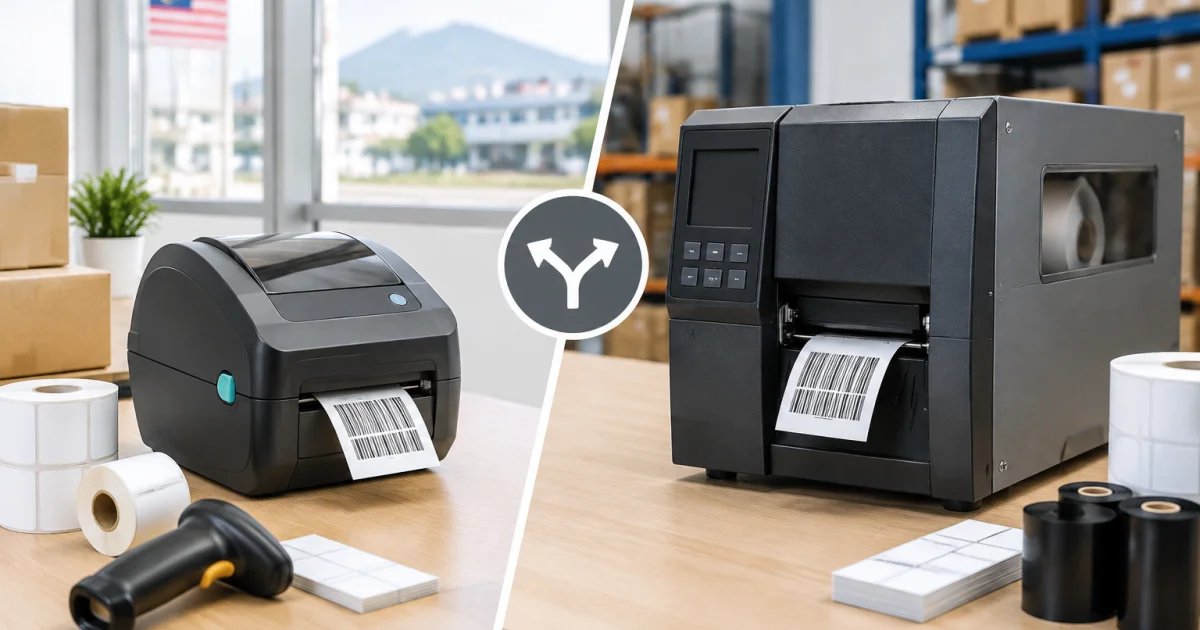

If you manage warehousing, production, or procurement, a barcode printer quickly becomes mission-critical. It affects pick-and-pack speed, traceability, warranty tracking, and how professional your parcels look. The challenge is choosing the right printer class—and a supplier that can support you after installation.
This beginner guide is for Malaysian operations comparing desktop and industrial barcode printers. You’ll learn how each fits different workflows, which specifications matter, and what to ask a barcode printer supplier in malaysia to avoid downtime, unreadable barcodes, or mismatched consumables.
Start with your workflow (not the printer model)
Instead of starting with brands and prices, map your process first. Both desktop and industrial units “print labels”, but they perform very differently when volume rises, materials change, or the environment is harsh.
Define requirements before requesting quotations:
- Where will printing happen? Office/packing table vs production line, cold room, dust, heat, or chemicals.
- How many labels per day? Include peak periods (promotions, month-end, stock counts, rework).
- What label sizes and materials? Product/carton/pallet/compliance; paper vs PP labels vs polyester.
- Downtime tolerance? Can you switch to a backup, or does the line stop?
- Who operates it? Admin vs warehouse vs line operators (gloves, speed, training).
With these answers, it’s easier to match printer type, print method, and consumables from day one.
Desktop barcode printers: best for light-to-medium daily printing
Desktop barcode printers are compact and built for moderate print runs in cleaner, space-limited areas (offices, retail backrooms, small e-commerce packing stations, SMEs).
When a desktop model is usually the right fit
- Lower to moderate daily volume without continuous all-day printing.
- Batch printing such as shipping labels, shelf labels, or small product labels.
- Limited space on counters or packing tables.
- Budget-focused setups that still need reliable, scannable output.
Desktop trade-offs to be aware of
Desktop units typically have smaller roll capacity, require more frequent ribbon/label changes, and can wear faster if pushed into heavy-duty cycles. They’re also more sensitive to knocks, frequent opening/closing, and dusty packing lanes. If you expect rapid growth or rough conditions, an industrial frame may be a safer investment.
Industrial barcode printers: built for heavy volume and tougher environments
Industrial barcode printers are designed for factories, high-throughput warehouses, and distribution hubs. They generally offer a sturdier chassis, larger media capacity, and components built for sustained use.
When an industrial model makes sense
- High daily output with long runs (carton, pallet, batch/lot labels).
- Multi-shift or 24/7 operations that require dependable uptime.
- Demanding environments (dust, heat, humidity, frequent handling).
- Fewer changeovers through larger label rolls and ribbon capacity.
Industrial trade-offs to plan for
Industrial printers need more space and cost more upfront, but they often reduce interruptions and last longer in heavy-use settings. Paired with the right label material, they can also cut reprints and scanning errors for durable identification needs.
Key specs that decide desktop vs industrial (practical checklist)
Use this checklist to compare options objectively when speaking to suppliers.
1) Print volume and duty cycle
Plan for peak demand, not average days. Ask what volume range the model is designed for and how it performs during long continuous runs, especially during promotions and stock counts.
2) Print method: direct thermal vs thermal transfer
- Direct thermal prints without ribbon and suits short-life labels. Heat/friction can fade print over time.
- Thermal transfer uses ribbon and is preferred when labels must last longer or resist smudging and handling.
For many warehouse and manufacturing applications, thermal transfer is the safer long-term choice for keeping barcodes readable through storage and transport.
3) Resolution (print clarity for small barcodes and text)
Resolution matters for small fonts, dense barcodes, and QR codes. If you print small product labels (e.g., cosmetics, pharma, electronics parts) or batch numbers, ask the supplier to review your artwork and confirm the design will print and scan cleanly.
4) Media handling: label width, roll size, and sensor types
Confirm the basics that commonly cause feeding and calibration issues:
- Maximum label width vs print width (not always identical).
- Roll capacity and core size (frequency of roll changes).
- Sensor support for gap, black mark, or continuous media.
If you’ll switch between formats (product labels today, cartons tomorrow), ask how fast changeovers are and whether sensors handle your media reliably.
5) Connectivity and integration (warehouse and production reality)
Ensure it fits your systems (ERP, WMS, POS, shipping software). Confirm required ports (USB/LAN/Wi-Fi) and stable drivers for your IT environment. Share your scanner and label design software details so the supplier can avoid template rework and manual “workarounds”.
6) Consumables: labels and ribbons that actually match your use case
The printer is only half the system; labels and ribbons determine durability and scanning performance. Some operations start with paper labels and later need tougher options like PP labels for moisture or polyester for higher durability. If you manage barcode label printing malaysia workflows, standardising material choices across SKUs helps keep output consistent.
Ribbon selection (wax, wax-resin, resin) affects scratch and smudge resistance. A cheap ribbon can create costly failures if labels don’t scan or cartons must be reprinted during dispatch.
How to evaluate a barcode printer supplier (Malaysia buyer’s criteria)
Even a good printer becomes a problem if setup, consumables, and troubleshooting support are weak. Use these practical checks when comparing suppliers.
1) Can they recommend the full solution, not just the printer?
Look for suppliers who understand label materials, ribbon pairing, and real application environments (cold rooms, oily surfaces, humidity, outdoor exposure). If you already source label sticker printing malaysia for retail-ready packs, alignment on specs and artwork templates can also reduce inconsistencies across packaging and barcode labels.
2) Do they offer sampling and testing?
Request sample prints on your intended material and test them in your actual process: scan rates, adhesion, rubbing, humidity, and cold storage. A reliable supplier should support trials or provide clear testing guidance.
3) After-sales support and spare parts readiness
Clarify response time, troubleshooting steps, and availability of common wear parts. This is critical for industrial environments where downtime delays production or dispatch.
4) Training and documentation for operators
Many issues come from incorrect loading, wrong ribbon choice, or skipped cleaning. Ask for operator training and simple maintenance routines to protect print quality and printhead life.
5) Ability to scale with you
If throughput or SKU count is growing, choose a supplier that can add printers, standardise consumables across departments, and support multiple sites.
Putting it together: simple decision scenarios
- Scenario A: SME e-commerce packing station — Batch shipping labels and occasional product stickers: a desktop printer is usually sufficient if size/connectivity match your needs.
- Scenario B: Warehouse with daily carton labelling — All-day carton labels with fewer roll changes: an industrial model often reduces interruptions.
- Scenario C: Factory line batch/lot labels — Durable prints and predictable uptime: consider industrial + thermal transfer with suitable media.
- Scenario D: Mixed use (product labels + outer cartons) — Either one robust printer that covers both, or two printers (desktop for admin/light use, industrial on the floor). A good supplier should recommend the lowest-risk setup.
Conclusion: buy for reliability, consumables fit, and long-term support
Desktop vs industrial is less about “small vs big” and more about matching workload, environment, and label durability. Desktop printers suit light-to-medium volume and tight spaces. Industrial printers suit higher throughput, tougher conditions, and fewer interruptions.
When you shortlist a barcode printer supplier in malaysia, prioritise practical guidance on labels and ribbons, support for installation and training, and dependable after-sales service. The goal is consistently scannable labels—without frequent rework, wasted rolls, or last-minute troubleshooting during dispatch.
Useful next reads: If you’re also improving retail or shipping presentation, you may find this guide helpful: How To Choose The Right Custom Box Printing In Malaysia For Your Products.
Related product pages: Explore Altrapac’s Barcode Printer options if you are comparing desktop and industrial models, or review packaging needs via Custom Box Printing for a more complete packing and labelling setup.
Frequently Asked Questions
How do I know if I should buy a desktop or industrial barcode printer?
Start with daily label volume, how long the printer will run continuously, and where it will be used. Desktop printers fit light-to-medium batch printing in cleaner environments. Industrial printers are better for high-volume, multi-shift printing, larger roll capacity, and tougher factory/warehouse conditions.
What information should I give a barcode printer supplier before requesting a quotation?
Share your label size, label material (paper, PP labels, polyester), estimated labels per day, print method preference (direct thermal or thermal transfer), connectivity needs (USB/LAN/Wi-Fi), and your environment (dust, humidity, cold room). If possible, provide your label artwork so the supplier can confirm resolution and scannability.
Do I need thermal transfer printing for barcode labels?
Not always, but thermal transfer is often recommended when labels must last longer, resist smudging, or face handling and temperature changes. It’s common for carton labels, product identification labels, and many manufacturing or warehouse use cases.
Why do barcodes sometimes scan poorly even with a new printer?
Common causes include low-resolution printing for dense barcodes, incorrect darkness/speed settings, mismatched ribbon and label stock, dirty printheads, or label designs with insufficient quiet zones. A supplier who supports barcode label printing Malaysia workflows can help test samples and tune settings before you roll out at scale.
Can one supplier support both barcode printers and custom packaging materials?
Yes. Some suppliers provide a one-stop solution covering barcode printer supply plus labels, stickers, and packaging. This can simplify procurement and help you keep label specs consistent with product packaging boxes, printed food packaging, or branded carton designs.
Need help choosing a desktop or industrial barcode printer?
Altrapac supports Malaysian businesses with barcode printer supply, compatible labels and ribbons, and practical guidance to match your workload and label materials. If you want a setup that prints clean, scannable barcodes with fewer interruptions, talk to our team and describe your environment, daily volume, and label sizes.